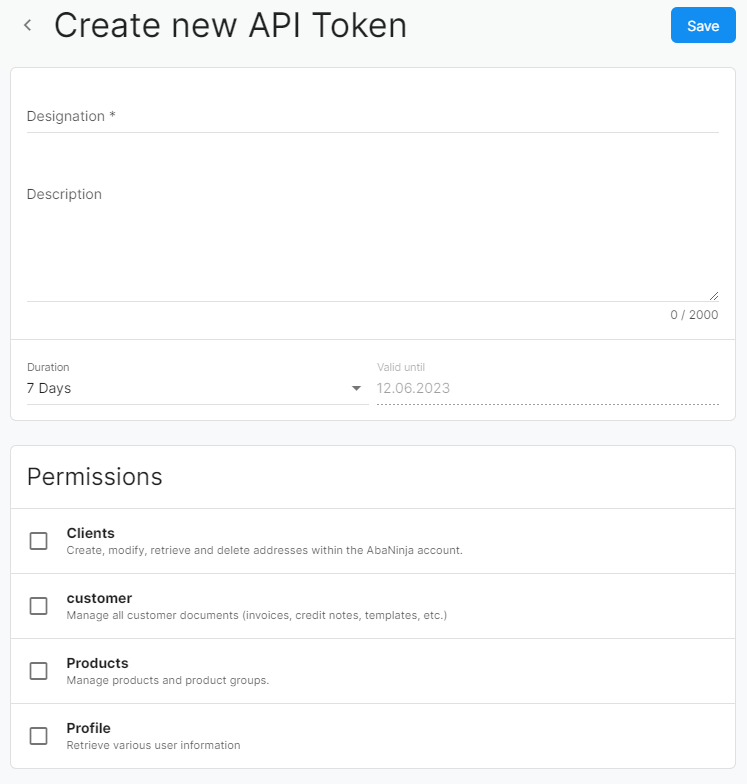
Create API Token
To create an API token, navigate to settings in AbaNinja. Under API Tokens, you can generate new tokens and set the access duration and permissions the token should have.
Benefits:
The AbaNinja API allows you to connect the software with other applications, such as industry software without its own invoicing or accounting. With the API token, you can access AbaNinja programmatically and use features like address management, document creation, or data queries.
Notes and tips
- After creating an API token, a BearerToken will be displayed. This will only appear once directly after creation. Copy the token immediately, as it will not be retrievable later for security reasons.
- The AccountUuid can be found within the Account Information. These are linked as a button on the page of API Tokens.
- The token is tied to your user and must be sent along with every request in the header as Authentication: Bearer
<BearerToken>. - API functionality is only available with a paid subscription.
- For more information, see the API documentation.