Holidays / Vacations
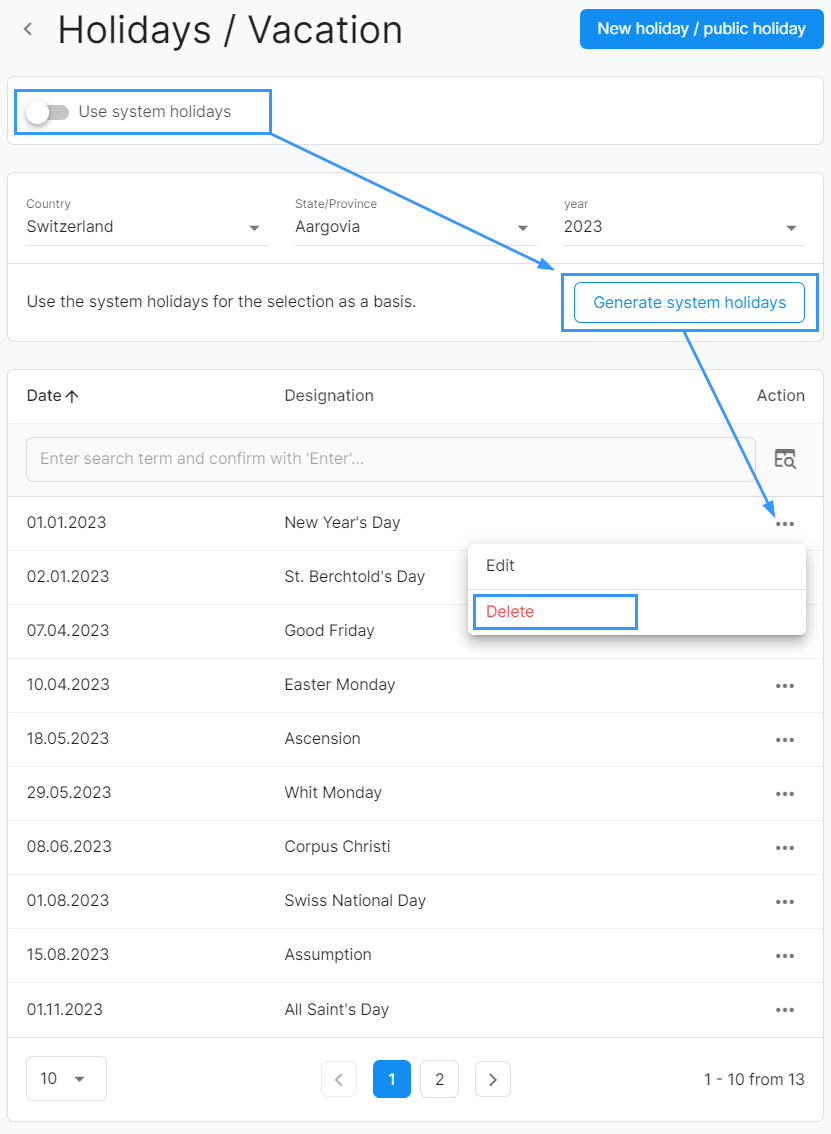
If you do not use the system holidays, you will have to manually enter the holidays. AbaNinja supports you with a function that allows you to generate the holidays based on the system holidays. Here's how:
- First, disable the "Use system holidays" option.
- Then, you can automatically load the official holidays for the desired year, country, and canton by clicking the "Generate system holidays" button.
- The generated holidays will then appear as separate entries in your list and can be individually edited or deleted by you to adapt them to the specific needs of your company.
Benefits:
With this function, you save time as you do not have to create each holiday individually. At the same time, you retain full control and flexibility to add, adjust, or remove holidays as you wish.
Notes and tips
- The generated holidays serve as a template. You can edit each entry individually, for example, change the date or delete a holiday.
- You can always add your own holidays or company events in addition.
- If you want to switch back to the system holidays later, simply reactivate the "Use system holidays" option.
- Use the search and filter functions to specifically find and manage holidays.